Deleting your account and data
Your data belongs to you. You can delete your account and the information associated with it at any time — no explanation is required. Below is how it works, what gets deleted, and what we are required to keep by law.
Before you delete
Account deletion is irreversible. The account, finished clips, saved faces, and face-swap history cannot be restored after deletion. If you want to keep any clips, download them first: after deletion the video links will stop working.
If your goal is not to delete the whole account but simply to remove some data, a gentler option may suit you:
- delete individual saved faces in the «Faces» section;
- delete individual finished clips in your face-swap history;
- hide your public profile by making it private in settings.
How to delete your account
- Open your account and go to the «Settings» section.
- Find the account deletion block.
- Confirm the deletion.
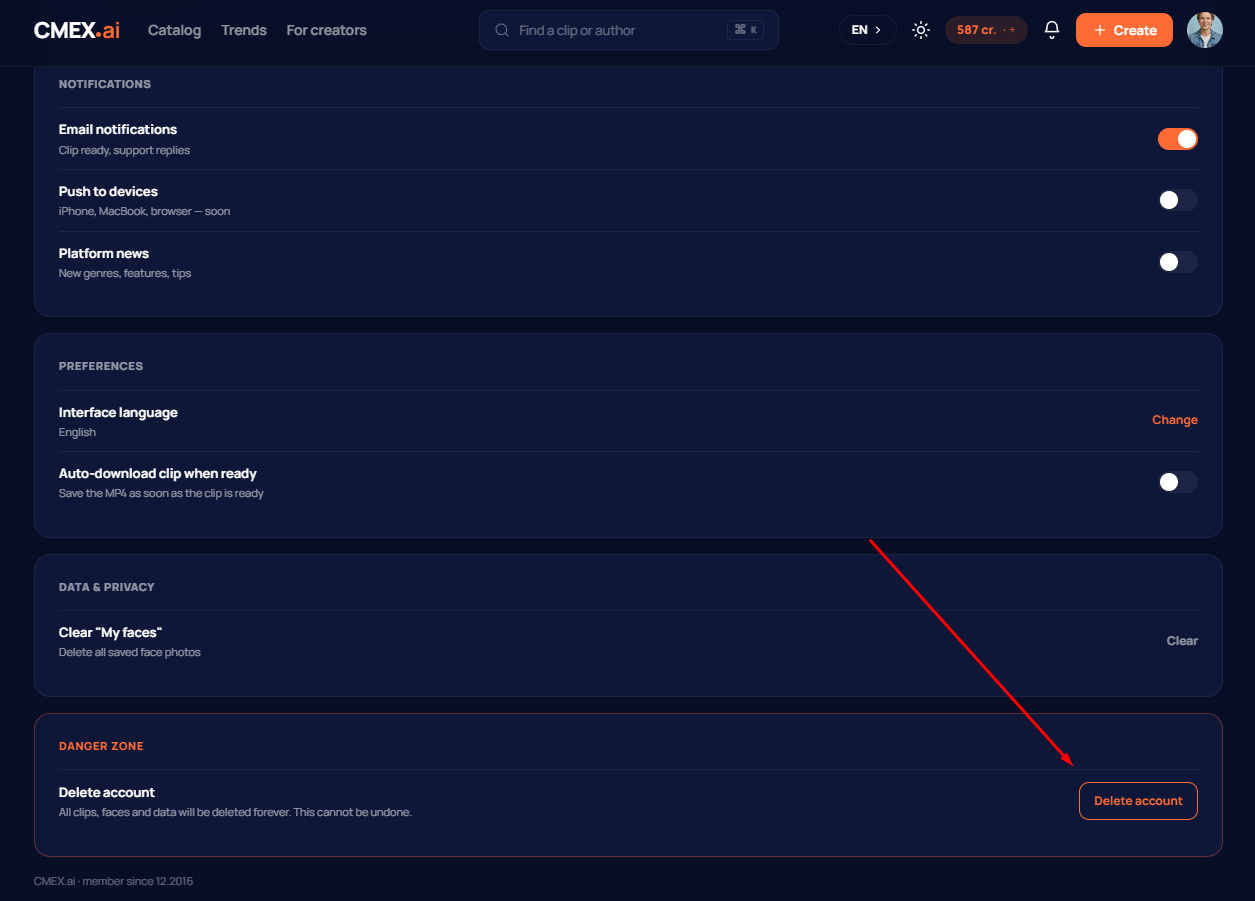
Once confirmed, a 7-day countdown begins, after which your account will be permanently deleted. During these 7 days, you can contact us if you change your mind.
What happens after deletion
Right after you confirm, the account is deactivated — you can no longer sign in, and your public profile stops opening. The associated data is removed irreversibly within 30 calendar days:
- biometrics — all uploaded face photos;
- finished videos — all your face-swaps;
- profile — name, username, avatar, settings;
- history of face-swaps and favourites.
What we are required to keep
Some data we cannot delete immediately — the law requires it. This applies above all to payment history: records of purchases are kept for no less than 7 years from the transaction date under US tax and financial legislation. After account deletion such records are anonymised — the link to your identity is removed, but the transaction record itself is retained until the statutory period expires.
Deleting data without deleting your account
You can request deletion of specific data without closing your account. Write to support@cmex.ai with the subject «Data Deletion Request» and include your account email and which data should be deleted. We will fulfil the request within 30 calendar days.
The exception is data we are legally required to keep (payment history, tax documents): it may be anonymised but not fully deleted until the statutory period expires.
Changed your mind?
Until the 7-day final-deletion period has passed, you can cancel the process — write to us at support@cmex.ai from the same email. Once the data is fully deleted, restoration is not possible.
Data contacts
Platform operator and data controller:
FunnyMoney Media Inc.
8 The Green, Suite A, Dover, Delaware 19901, United States
Email for data and deletion matters: support@cmex.ai